Tools and Software
Cell Trainer
Introduction
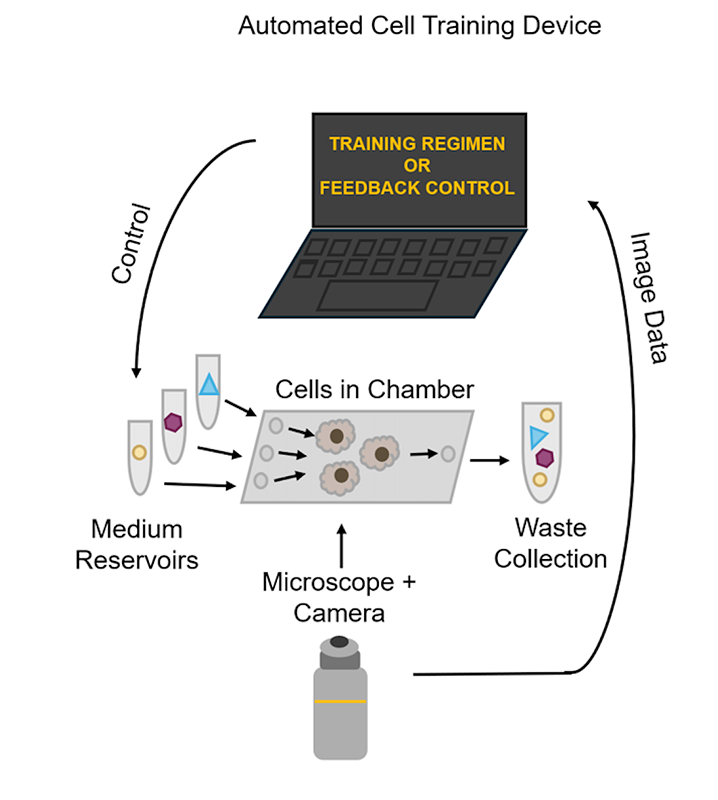
Understanding cells‘ behaviors, their problem-solving capabilities, and their ability to respond to environmental stimuli over time requires an automated platform that can provide stimuli as a function of measured cell state. The Cell Trainer is a device capable of performing a wide variety of automated experiments using training techniques to study learning and memory in non-neural mammalian cells. While an experiment is run, the Cell Trainer (1) delivers pulses of drugs or other chemicals to stimulate cells in up to four microfluidic chambers simultaneously and (2) automates the capture of bright field or fluorescence images to produce time series. It can operate in either an open-loop (feedforward) or closed-loop (feedback-controlled) mode. During open-loop operation, the Cell Trainer delivers a pre-scheduled series of drug pulses for the cells to respond to, while in closed-loop operation, the Cell Trainer tracks cells’ behaviors in real time and switches medium sources according to a user-programmed control policy. The collected images are analyzed with a pipeline that tracks the learning and behaviors of individual cells throughout each experiment and quantifies population heterogeneity. Once the Cell Trainer experiment is started, consistent, time series data is captured with minimal scientist intervention that can be analyzed to study the training of non-neural mammalian cells.
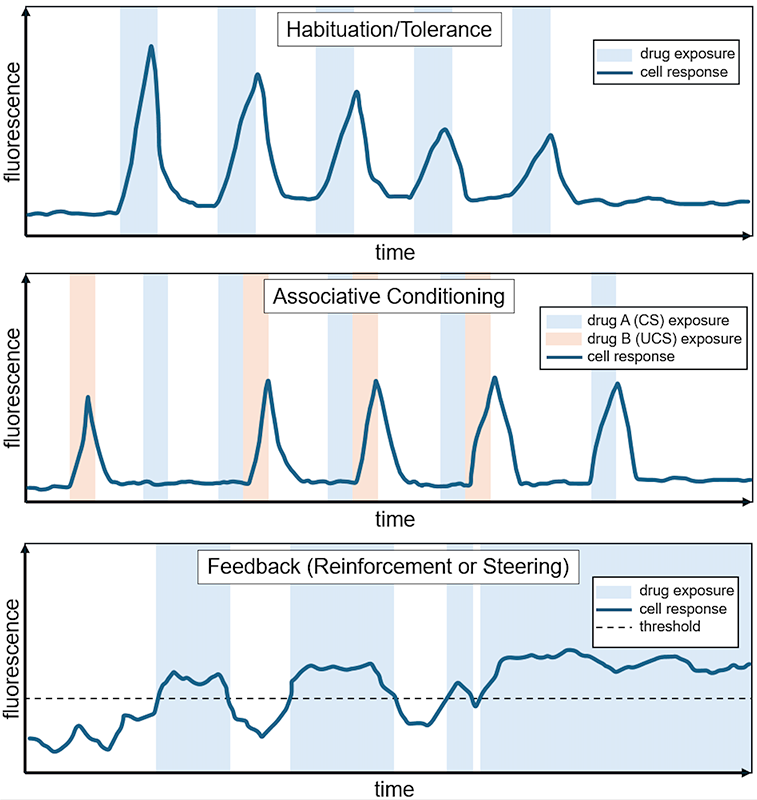
Example training regimens for non-neural mammalian cells
Device Features
The system is composed of a microfluidic system housing the cells and medium reservoirs, a microscopy component to observe cell states and responses, and a computer that controls the components and implements desired closed-loop control policies.
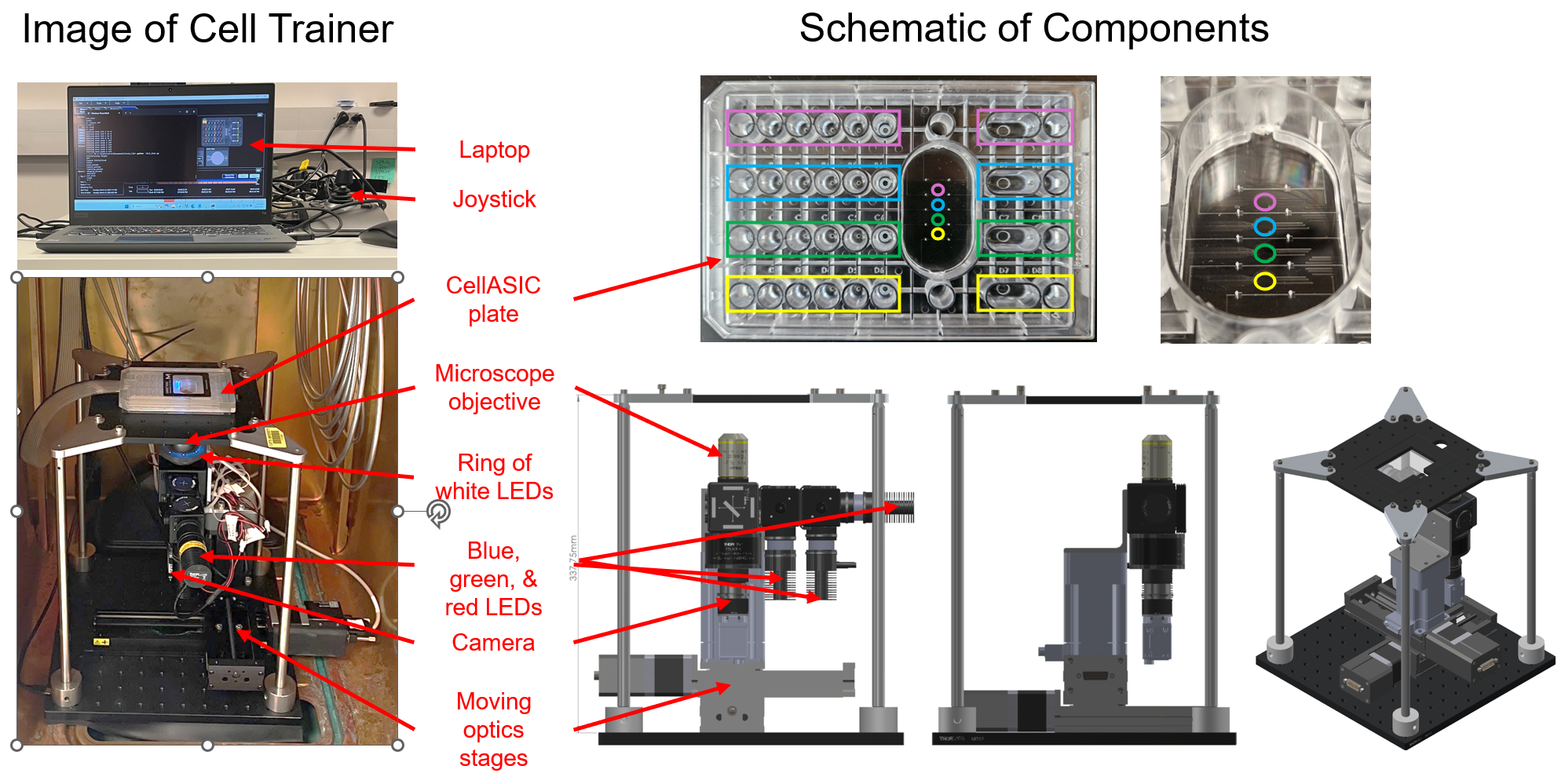 The CellASIC® ONIX2 microfluidic system (user guide) from MilliporeSigma is used as a microfluidic culture system for adherent mammalian cells.
- There are four transparent microfluidic cell culture chambers per plate for running multiple samples simultaneously.
- There are four reservoirs to hold different medium types for each microfluidic cell culture chamber. The fluidic system can switch between these reservoirs to expose cells to different drugs at programmed times.
- The plate is attached to a controller unit that uses air pressure to control fluid flow rate through the microfluidic cell culture chamber.
- The microfluidic system is on a standard Society for Biomolecular Screening (SBS) format plate making it a familiar format for wet lab scientists.
A team at the Wyss Institute at Harvard University lead by Adama Sesay Ph.D. created a custom, open source fluorescence microscope with camera (PDF, SLDDRW, and STEP files) to automate the image collection process for training experiments.
- The optics are mounted on movable stages to consistently image the same locations in the microfluidic cell culture chamber over the time course of the experiment.
- There are red, green, and blue excitation LEDs to image multiple fluorescent reporters in the far red, red, and green emission channels during the same experiment.
- There is white LED illumination to take brightfield images of the cells.
- The microscope dimensions fit in a standard incubator with inside dimensions of 470 x 607 x 576 mm (18.50 x 23.90 x 22.68 inch) (W x H x D) to maintain desired cell culture conditions.
A bill of materials was created that lists the commercially available components and their price.
Software Features
Custom software was written to automate control of the microscope and camera during a training experiment.
- At the start of the experiment, the user specifies the following information for imaging the microfluidic cell culture chambers
- imaging locations in x, y, and z coordinates
- camera exposure
- camera gain
- microscope LED brightness
- time interval of image collection
- The custom software automates the image collection during the course of the training experiment, iterating between all imaging locations in a repeating loop with the specified time interval
Feedforward (open-loop, pre-defined) cell training experiments are run through the CellASIC® ONIX2 software (User Guide Section 7).
- CellASIC® ONIX2 software allows users to control training regimes by specifying the media reservoir, the duration of each treatment, and the fluid flow rate.
A custom, publicly available image analysis pipeline was created to assess single cell learning.
- The pipeline uses a timeseries of images collected from the Cell Trainer to
- identify single cells across all the images of the timeseries
- estimate and remove the background fluorescence artifacts
- track each individual cell’s fluorescence across all images of the time series
- normalize the fluorescent traces
- Desired metrics of learning and other behaviors can then be applied to each individual cell, and the population as a whole can be analyzed
Feedback (closed-loop, cell response-defined) cell training experiments are run with a custom, publicly available pipeline that integrates the custom microscope, CellASIC® ONIX2 and image analysis software described above.
- The user writes their desired control policy that dictates how the operation of the CellASIC® ONIX2 should change based on the fluorescence response of the cells in the culture.
- An example control policy: when the average single cell fluorescence drops below a threshold value, run a two minute perfusion of a media reservoir containing drug
- The custom microscope script is set to run, collecting a time series of images at the desired time interval
- The image analysis is automatically performed by the software immediately after the image is taken
- After image analysis, the control policy script sends commands to the CellASIC® ONIX2 through its API to modify its operation accordingly.
Documents
- Erickson, Patrick, et al. "A platform for automated training of mammalian cell physiology." bioRxiv (2026): 2026-08. DOI: 10.64898/2026.08.13.744473
- Custom microscope schematics created by the Wyss Institute at Harvard University (PDF, SLDDRW, and STEP files)
- CellASIC® ONIX2 Manual (user guide)
- Cell Trainer Bill of Materials for Commercially Available Parts (excel sheet)
Custom Software
Available under a modified Apache license
- Github repository for code to operate the custom mobile microscope
- Github repository for feedback control, image analysis, and data analysis
Funding
We thank the Templeton World Charity Foundation, Inc. for supporting this work. Funded by TWCF-2021-20606.